

How do I set up a speed sensor?
Mount your Bluetooth speed sensor on the rear wheel hub, then add it in the TrainerDay mobile app under Settings → Add Devices; there is no wheel size or calibration to set, and only riders on a basic trainer also pick a virtual power curve.
- Mount the Bluetooth speed sensor on the rear wheel hub.
- In the TrainerDay mobile app, open the Settings tab → Add Devices. Tap + next to the sensor under Available. If it is missing, remove it from your phone's Bluetooth settings: pair it only inside TrainerDay.
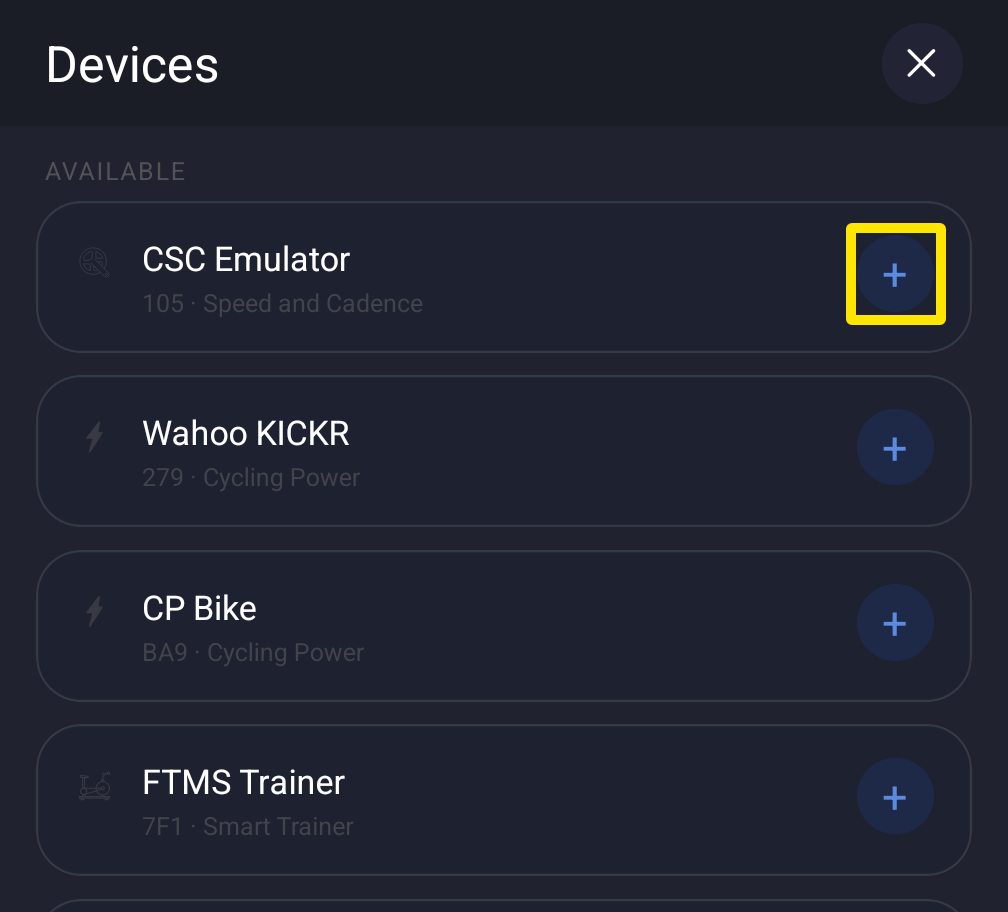 Where: Mobile app · Settings tab → Add Devices
- Basic (non-smart) trainer only: on the sensor's card, tap Power, then the Virtual Power Curve link under the tags. This opens the Trainer Selector. Pick your trainer or Generic Trainer, then tap Done.
Good to know: There is no wheel size or calibration setting. The app assumes a 700c wheel (2098 mm). With a smart trainer, the smart trainer supplies the power readings, and on-screen speed is worked out from your power and weight.
Works on: Mobile app. The desktop app connects Bluetooth speed sensors but has no virtual power and does not read ANT+ speed sensors. Not on the website.