

Why does my cadence sensor keep disconnecting?
A cadence sensor usually drops when another app, bike computer or watch is already connected to it, or when it was paired in the phone's Bluetooth settings; fix it in the mobile app's Settings tab → Add Devices by freeing the sensor, forgetting it in the phone and waking it.
- In the mobile app, open the Settings tab → Add Devices. The device whose Cadence tag is filled with live rpm is your cadence source. This is the sensor to fix.
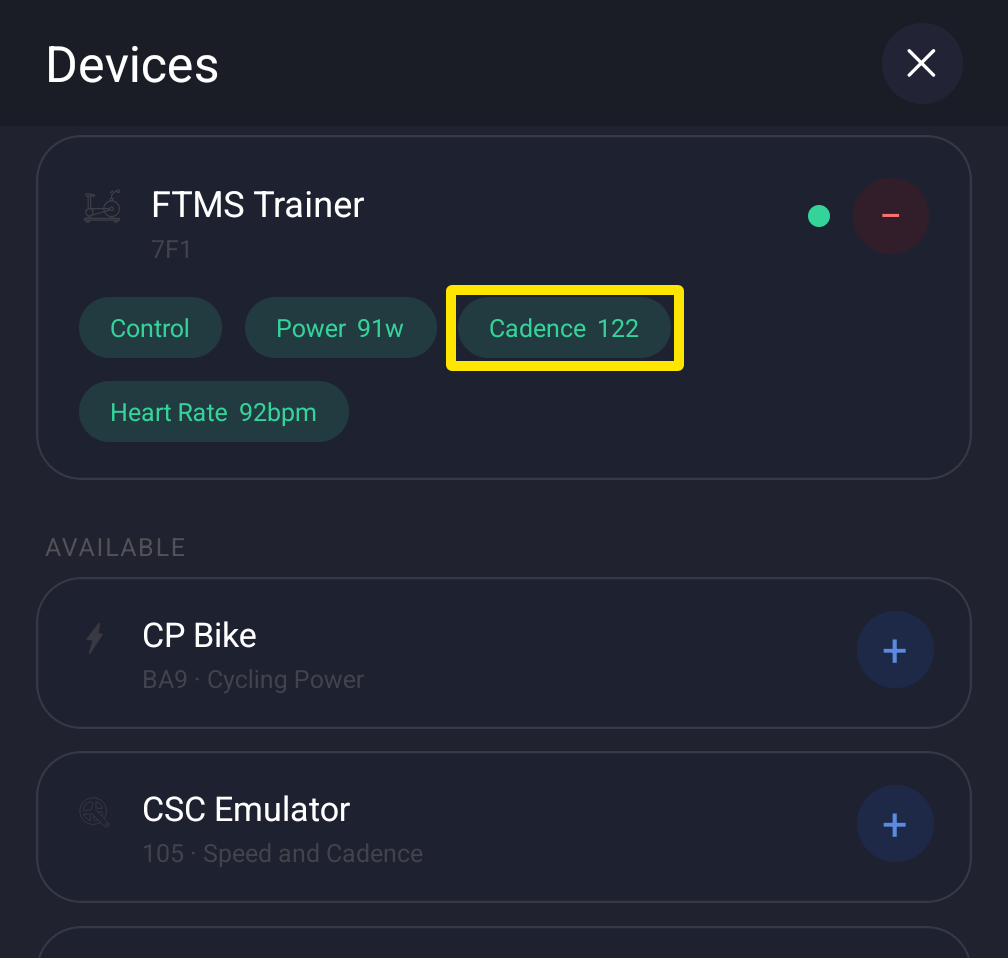 Where: Mobile app · Settings tab → Add Devices
- Close Zwift and other apps. Disconnect the sensor from any bike computer or watch already connected to it.
- Leave TrainerDay and open your phone's Settings → Bluetooth. If the sensor is listed there, forget it. Wake the sensor by spinning the crank.
- Switch back to the TrainerDay app and open the Settings tab → Add Devices again. Still dropping? Tap Missing Device?, pick the sensor and follow the steps. They end with turning Bluetooth off and on or restarting the phone.
Good to know: In the desktop app, open the Devices window and click Not connecting? under the sensor for the same help.
Works on: mobile app and desktop app (Mac, Windows); not the website.