

How do I get a refund for a duplicate or accidental charge?
To get a refund for a duplicate or accidental charge on the TrainerDay website, find the extra charge under Payment History on your subscription page, then email [email protected] with its invoice number and date. App Store charges are refunded by Apple instead.
Charged through the App Store? Apple refunds that charge, not TrainerDay. A Google Play charge is refunded by Google or TrainerDay support. The steps below are for charges made on the TrainerDay website.
- On the website, click the gear icon at the top of the left menu and choose Account.
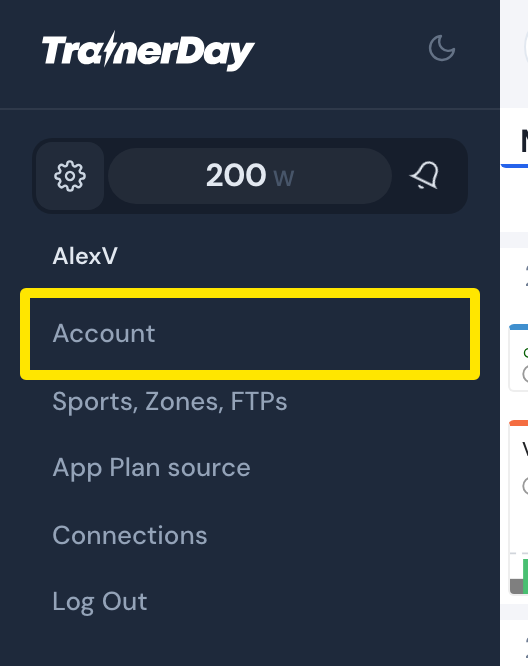 Where: Website · left menu → gear icon · open it
- On the Account page, click Manage your subscription.
- On the subscription page, find the extra charge under Payment History (Invoice #, Amount, Date).
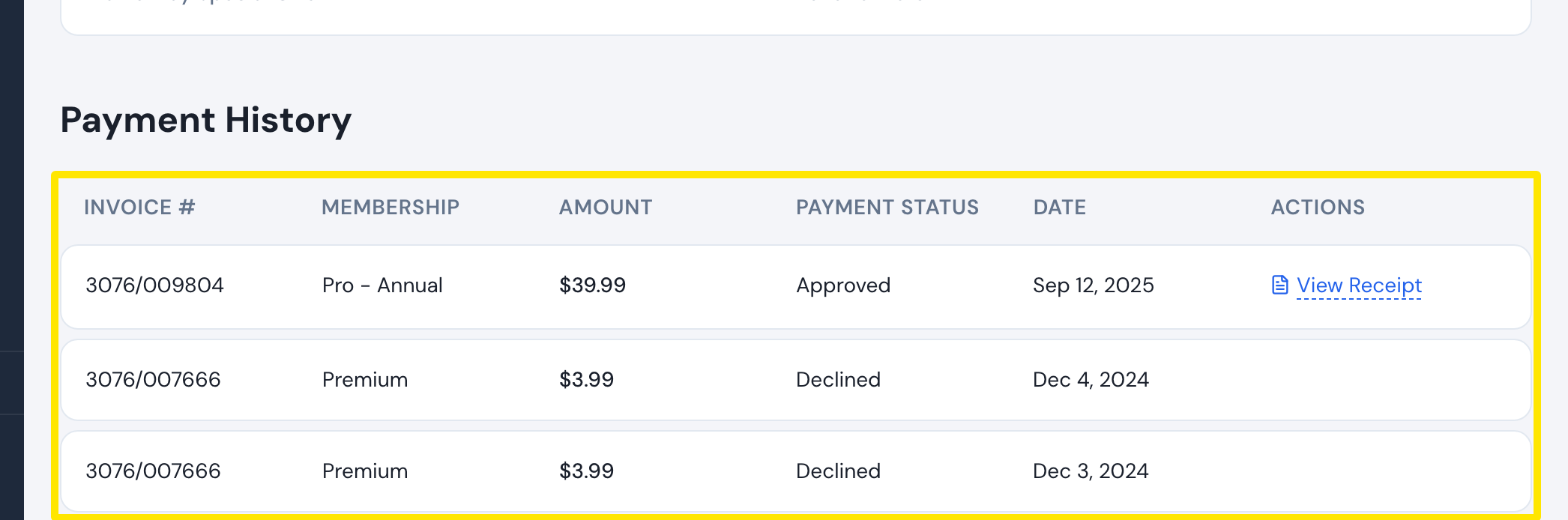 Where: Website · Manage your subscription · open it
- If two subscriptions are listed under Subscription Status, cancel the extra one with Cancel subscription.
- Write to [email protected] from your account email with the invoice number and date of the extra charge.
Good to know: Both Stripe and PayPal payments are refunded. A temporary PayPal hold is released by PayPal, not refunded.
Works on: website. The desktop app has no billing screen.