

How do I send a ride file or activity link to support?
Download a ride's FIT or TCX file from My Activities on the TrainerDay website, then email it or the ride's page link to [email protected].
- On the website, open My Activities (app.trainerday.com/activities) and click the ride's name.
- Click the three-dots menu at the top right of the ride, then Download FIT file (or Download TCX file).
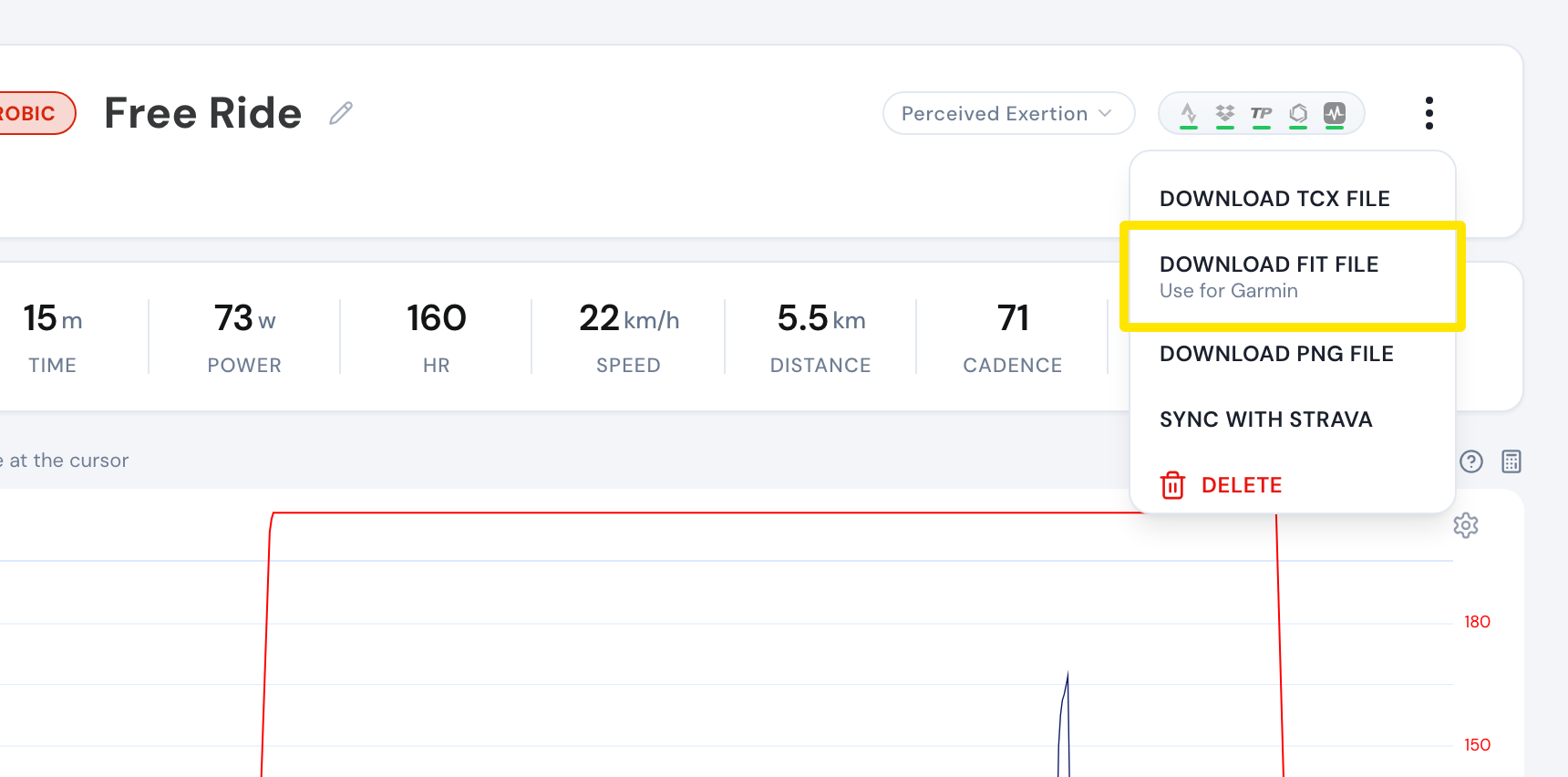 Where: Website · My Activities → click the activity's name · open it
- Attach the file to an email to [email protected]. Or send the ride's page address (app.trainerday.com/activities/…) from your browser's address bar.
 Where: Website · trainerday.com Contact Us page (trainerday.com/contact-us)
Good to know: Only rides recorded in TrainerDay can be downloaded. Rides imported from Strava or Garmin cannot. An activity link opens only for you and TrainerDay support, not for other riders.
Works on: Website (above); mobile app: Activities tab → open the ride → share icon → TCX or FIT; desktop app: Activities → the ride → export TCX or FIT.