

How do I convert a power workout to heart rate targets?
On the TrainerDay website, open My Calendar, click a bike workout's three-dot menu and choose Convert to HR (Pro) to give it heart rate targets.
- On the website, open My Calendar in the sidebar (https://app.trainerday.com/calendar) and find the workout.
- Click the workout's three-dot menu and choose Convert to HR (Pro). The workout now shows heart rate targets, and calendar sync to Garmin and other apps sends it with HR targets.
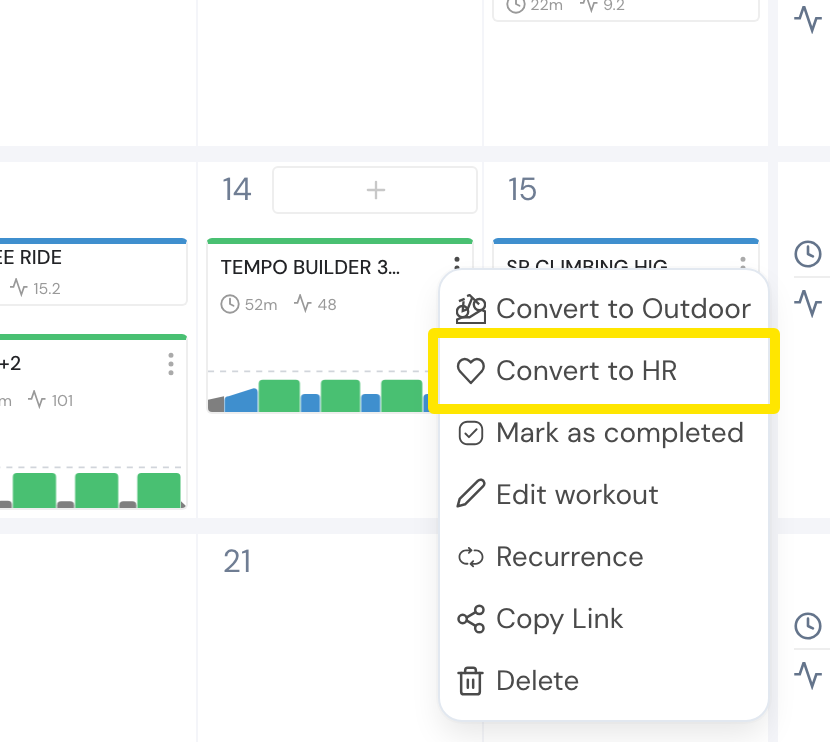 Where: Website · My Calendar · open it
- To change it back, open the same three-dot menu and choose Convert to Indoor.
Good to know: Each power zone becomes a heart rate % of your threshold HR, from your heart rate zones.
Works on: Website (My Calendar). Mobile app: in Calendar, open a workout's menu and choose Ride as → Heart rate. Desktop app: no conversion.